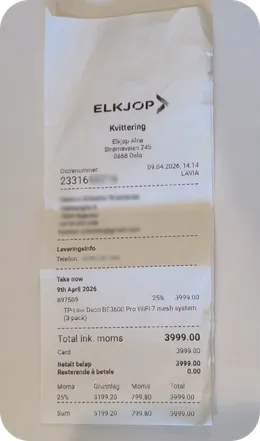
We suggest how to record the purchase. You check it and reply “approve”.
Easypeasy
iMessage Today 09:41
You:
Easypeasy:
The receipt from Elkjøp is for NOK 3,999. I suggest recording the purchase as computer equipment. Is that correct, and is the purchase for your business? Reply “approve”.
You:
Approve
Easypeasy:
The receipt has been recorded ✓ You can find the document in Easypeasy.
02 / Invoices
Send invoices with a message.
Tell us which invoice to send. We ask you before sending it.
Easypeasy
iMessage Today 09:41
You:
Send invoice 1042 to Norsk Design AS as EHF.
Easypeasy:
Invoice 1042 to Norsk Design AS is for NOK 12,500. Shall I send it as EHF?
You:
Yes, send it 👍
Easypeasy:
The invoice has been sent to Norsk Design AS ✓
03 / Mileage log
Register a trip with a message.
Write where you drove and why. We add the trip to your mileage log.
Easypeasy
iMessage Today 09:41
You:
I drove from Storgata 1 in Oslo to Bragernes torg 2 in Drammen today to meet a customer.
Easypeasy:
Did you make any stops? Did you have passengers or extra equipment, tow a trailer or drive on a forest road?
You:
No.
Easypeasy:
The trip has been registered in the mileage log ✓ The date, route and purpose have been added.
Examples of how to use Easypeasy in iMessage.
Questions about iMessage?
What can I do with Easypeasy in iMessage?
Send us a photo of a receipt, ask us to send an invoice or tell us where you drove. You do it in iMessage. Easypeasy is made for sole proprietors in Norway.
How do I connect iMessage?
You need an Easypeasy account and a phone number with iMessage. Go to Settings → Integrations and choose iMessage. Enter your number and confirm with the code you receive. Then you can send us messages and photos.
Is the receipt recorded as soon as I send the photo?
No. We suggest how to record the purchase. Check that the details are right and that the purchase is for your business. Reply “approve” when it is correct. If we need more information, we ask you.
Does using iMessage cost extra?
iMessage is included in the Accounting plan at 149 NOK per month excluding VAT. You pay nothing extra for iMessage. It is not included in the free invoicing plan.
Send a message when you need us
Connect iMessage to Easypeasy. Then you can send us your first message.
 Easypeasy